

With so many moving pieces, it helps to know that 3 in 4 couples end up spending more than they originally planned — knowing this upfront makes it easier to build a budget that actually holds. With Pudding, just enter your total budget, and optimal amounts are automatically distributed across 9 categories and 50 items.
Create Your Budget
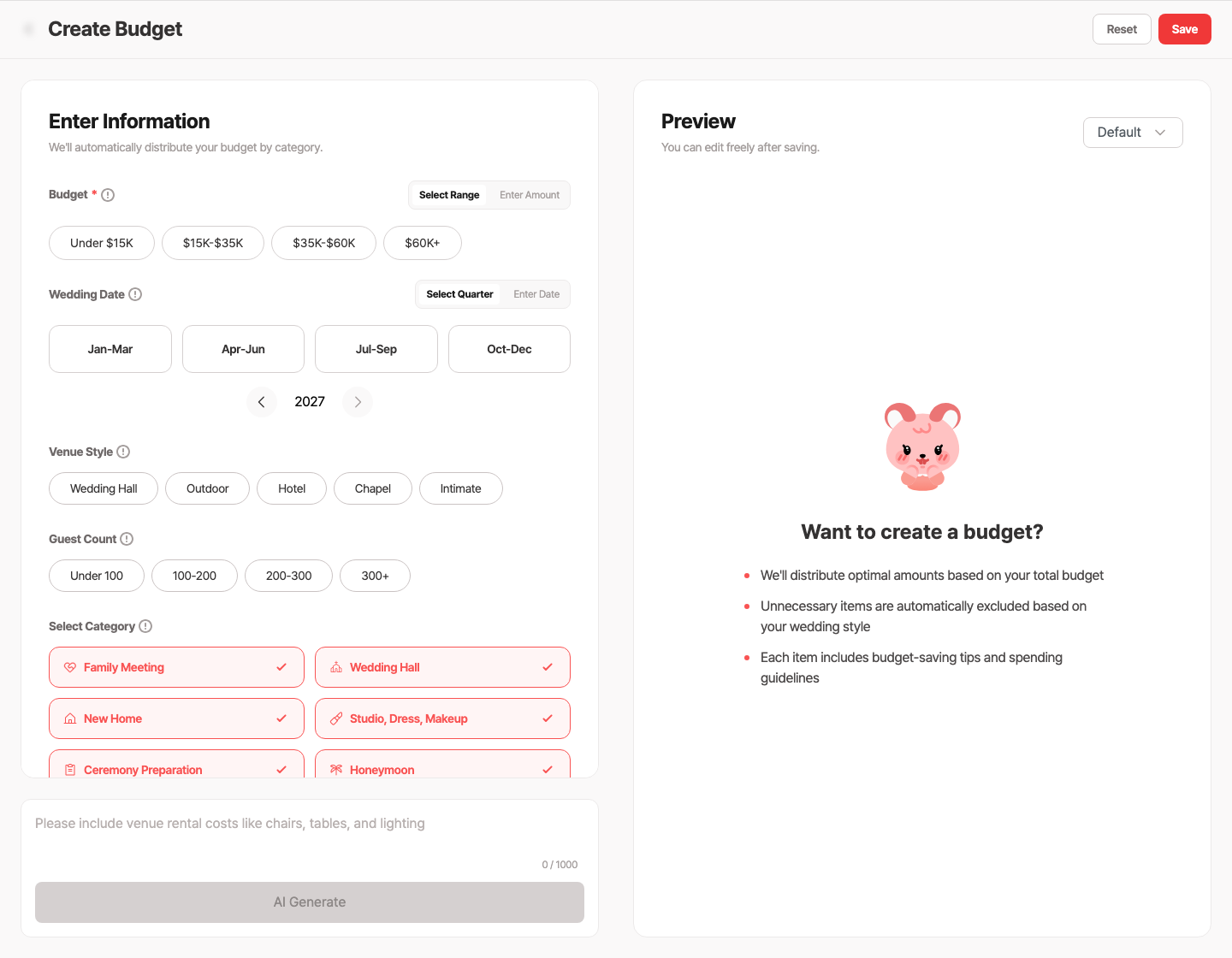
Service charges and taxes on catering alone can add up to 20% extra, so reviewing what's included in the contract upfront means far fewer surprises on the day. Enter just your total budget and a 9-category breakdown is automatically set up, hidden costs included.
There are 4 inputs when creating a budget. Total budget (e.g. $35,000), budget tier (practical / balanced / premium), guest count (small / medium / large), and wedding date (your planned date or quarter). You can also add freeform requests like "photography is really important" or "we're planning an international honeymoon" and AI will automatically boost those proportions. If you're not happy with the result, you can regenerate a different version and compare multiple versions.
9 Categories
The AI-generated budget is automatically organized into 9 categories. Service charges, rings, and invitations, the items easy to miss when drafting your first budget, are all included.
Categories and items can be freely added or removed. Customize the AI-generated structure to fit your situation.
Real-Time Dashboard
Once your budget is created, you can see the full picture on the dashboard at a glance. Target budget, spent, projected, upcoming, and remaining budget are all displayed, and the status tells you instantly whether you're under or over budget.
When you go over budget, the status turns red. You can immediately see which category caused the overage and respond quickly.
Track Spending Per Item
Each item lets you record recommended budget and actual spending separately. Items also display practical tips generated by AI.
Dress Rental
Recommended: $2,500
Spent: $3,000
Tip: "You'll need 2-3 fittings. Check whether a dresser helper ($300) is included."
When you enter spending, the dashboard totals recalculate automatically.
AI Edit Suggestions
As you manage your budget, AI proactively suggests missing items. If there's no photo/styling category, it asks "Add a photography section?" It also suggests adding a contingency fund if missing, and full budget redistribution when you have 2+ categories. AI suggestions are shown in priority order based on your current budget state.
AI Redistribution
Sometimes you save on one item and want to spend more on another. Tap "Redistribute" and items already spent stay as-is, while unspent items get optimally redistributed by AI within the remaining budget. Amounts are rounded to clean increments.
AI redistribution is free once per day. PRO allows up to 100 per day. You can also make freeform requests like "spend more on photography" or "reduce the honeymoon budget."
See How Other Couples Budget
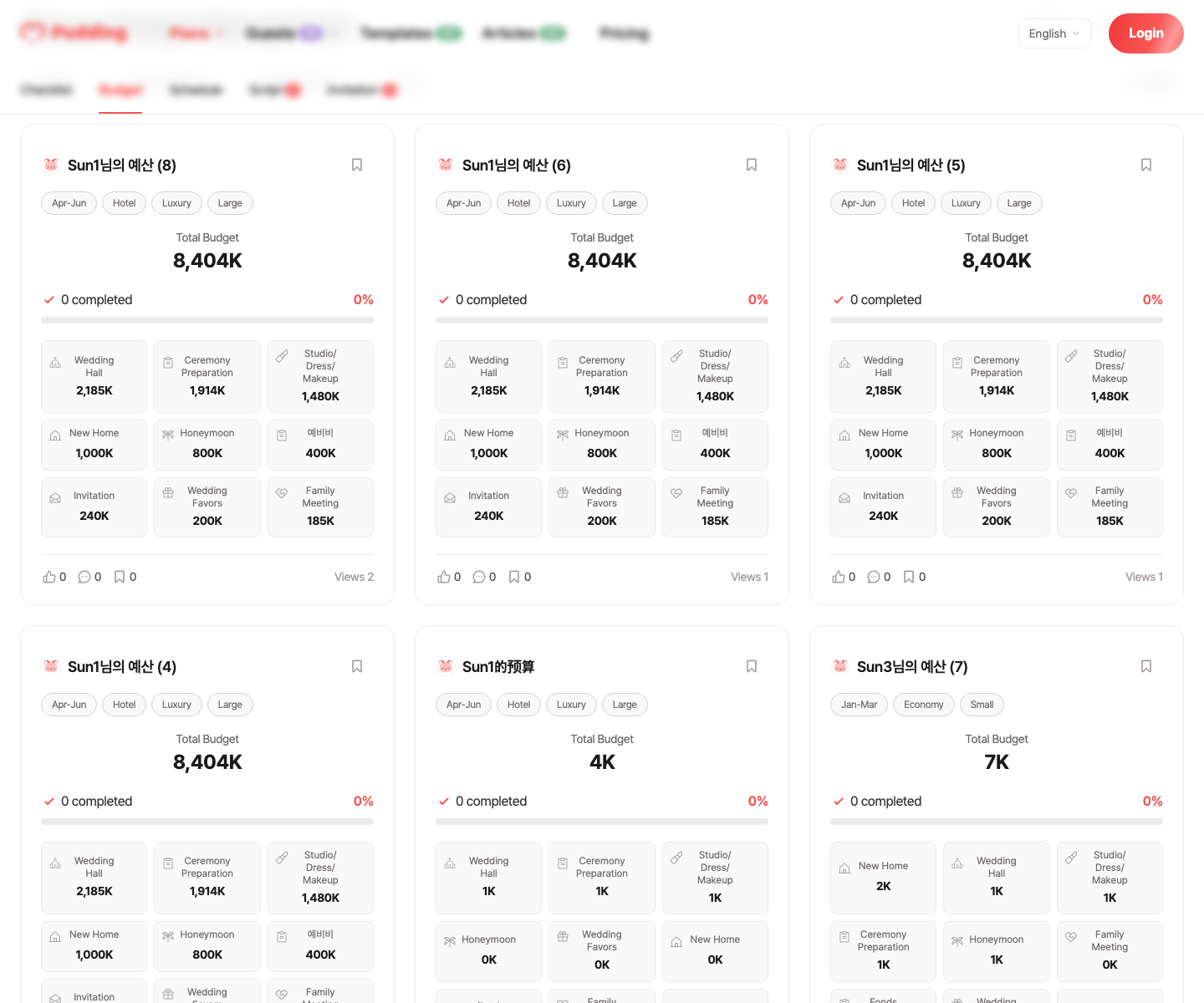
Set your budget to public and other couples can reference it. You can also browse other couples' public budgets and compare where similar budgets are being spent differently. React with likes, bookmarks, and comments on helpful budgets.
Manage Together with Your Partner
Invite your partner to view the same budget together. HOST is the budget creator with full permissions. WRITE is the invited partner who can view and edit. When your partner enters spending, it appears on your screen immediately.

Spreadsheet vs. Pudding
Frequently Asked Questions
Detailed Budget Guides
For more information, check these guides.
- Costs you might overlook: 13 Hidden Costs →
- Concrete ways to save: 10 Budget Saving Tips →
- Actual cost data per item: 2025 Wedding Cost Breakdown →
Budget Checklist
Check before finalizing your budget
Don't Build Your Budget From Scratch
Related Posts
View List
The Gift-Giving Landscape Is Changing Fast
Wedding Registry, Rings & Home Setup: The Complete Guide
Attitudes toward wedding gifts and registries are shifting rapidly. Understanding current trends can save you real money, and stress.

Saving Methods
Same Wedding, Save $20,000
56% of couples experience spending more than their original wedding budget. Having a savings strategy in place from the start makes all the difference.

Vendor Fee Surprises
Hidden Wedding Costs Your Budget Spreadsheet Misses
Nearly 69% of couples end up spending more than their original budget — and knowing why makes it easy to plan ahead.
 Miraculous Wine
 Spirited MorningSpirited Morning
With so many moving pieces, it helps to know that 3 in 4 couples end up spending more than they originally planned — knowing this upfront makes it easier to build a budget that actually holds. With Pudding, just enter your total budget, and optimal amounts are automatically distributed across 9 categories and 50 items.
Create Your Budget
Service charges and taxes on catering alone can add up to 20% extra, so reviewing what's included in the contract upfront means far fewer surprises on the day. Enter just your total budget and a 9-category breakdown is automatically set up, hidden costs included.
There are 4 inputs when creating a budget. Total budget (e.g. $35,000), budget tier (practical / balanced / premium), guest count (small / medium / large), and wedding date (your planned date or quarter). You can also add freeform requests like "photography is really important" or "we're planning an international honeymoon" and AI will automatically boost those proportions. If you're not happy with the result, you can regenerate a different version and compare multiple versions.
9 Categories
The AI-generated budget is automatically organized into 9 categories. Service charges, rings, and invitations, the items easy to miss when drafting your first budget, are all included.
Categories and items can be freely added or removed. Customize the AI-generated structure to fit your situation.
Real-Time Dashboard
Once your budget is created, you can see the full picture on the dashboard at a glance. Target budget, spent, projected, upcoming, and remaining budget are all displayed, and the status tells you instantly whether you're under or over budget.
When you go over budget, the status turns red. You can immediately see which category caused the overage and respond quickly.
Track Spending Per Item
Each item lets you record recommended budget and actual spending separately. Items also display practical tips generated by AI.
Dress Rental
Recommended: $2,500
Spent: $3,000
Tip: "You'll need 2-3 fittings. Check whether a dresser helper ($300) is included."
When you enter spending, the dashboard totals recalculate automatically.
AI Edit Suggestions
As you manage your budget, AI proactively suggests missing items. If there's no photo/styling category, it asks "Add a photography section?" It also suggests adding a contingency fund if missing, and full budget redistribution when you have 2+ categories. AI suggestions are shown in priority order based on your current budget state.
AI Redistribution
Sometimes you save on one item and want to spend more on another. Tap "Redistribute" and items already spent stay as-is, while unspent items get optimally redistributed by AI within the remaining budget. Amounts are rounded to clean increments.
AI redistribution is free once per day. PRO allows up to 100 per day. You can also make freeform requests like "spend more on photography" or "reduce the honeymoon budget."
See How Other Couples Budget
Set your budget to public and other couples can reference it. You can also browse other couples' public budgets and compare where similar budgets are being spent differently. React with likes, bookmarks, and comments on helpful budgets.
Manage Together with Your Partner
Invite your partner to view the same budget together. HOST is the budget creator with full permissions. WRITE is the invited partner who can view and edit. When your partner enters spending, it appears on your screen immediately.
Spreadsheet vs. Pudding
Frequently Asked Questions
Detailed Budget Guides
For more information, check these guides.
- Costs you might overlook: 13 Hidden Costs →
- Concrete ways to save: 10 Budget Saving Tips →
- Actual cost data per item: 2025 Wedding Cost Breakdown →
Budget Checklist
Check before finalizing your budget
Don't Build Your Budget From Scratch
Related Posts
View ListThe Gift-Giving Landscape Is Changing Fast
Wedding Registry, Rings & Home Setup: The Complete Guide
Attitudes toward wedding gifts and registries are shifting rapidly. Understanding current trends can save you real money, and stress.
Saving Methods
Same Wedding, Save $20,000
56% of couples experience spending more than their original wedding budget. Having a savings strategy in place from the start makes all the difference.
Vendor Fee Surprises
Hidden Wedding Costs Your Budget Spreadsheet Misses
Nearly 69% of couples end up spending more than their original budget — and knowing why makes it easy to plan ahead.
Miraculous WineSpirited MorningSpirited Morning